New Instagram Features and Unfollower Apps in 2026
By Shyview · · Updated · 8 min read
In this article9 sections
- New Instagram features in 2025 and 2026
- Which of them change what you can see about followers
- What Insights tells you about unfollows
- What the official API allows, and what it doesn't
- Are unfollower apps safe to use?
- A safe way to see who unfollowed you
- What to do when your follower count drops overnight
- Looking at public accounts without logging in
- FAQ
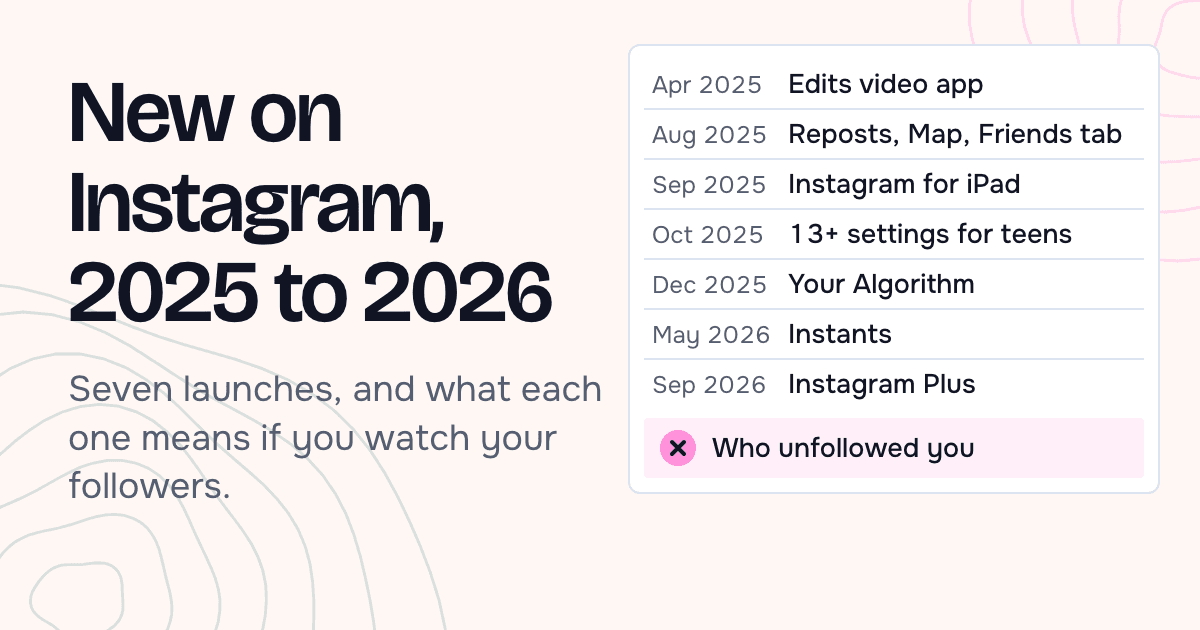
The new Instagram features of 2025 and 2026 cover a lot of ground. Between January 2025 and September 2026, Instagram added reposts, a friends map, an iPad app, topic controls for your feed, disappearing photos and a paid tier. Not one of these features tells you who unfollowed you. Instagram still doesn't notify anyone about an unfollow, its official API still won't hand an app your follower list, and its own Insights only count the people who left.
So the honest answer to "how do I see who unfollowed me in 2026" hasn't changed much. You compare two copies of your follower list. This guide walks through what's new, what each change means for anyone watching their followers, and the one method that doesn't put your account at risk.
New Instagram features in 2025 and 2026
Here is what Meta announced on its own newsroom and help pages, in order. Dates are launch announcements in the US; some features reached other countries later.

- Edits, April 22, 2025. A separate video editing app for phones, aimed at people who make Reels (Meta newsroom).
- Reposts, Instagram Map and a Friends tab in Reels, August 6, 2025. You can repost public reels and feed posts. The map lets you share your last active location with friends you pick, and it's opt-in. The Friends tab shows public content your friends interacted with (Meta newsroom).
- Instagram for iPad, September 3, 2025. A full app for the bigger screen, which Instagram says people had asked for "for a while" (Instagram blog).
- 13+ content settings for Teen Accounts, October 14, 2025. Teen Accounts now follow a standard modeled on PG-13 movie ratings by default (Meta newsroom).
- Your Algorithm, December 10, 2025. You can view and edit the topics that shape your Reels. It reached Explore on April 15, 2026 and Feed on June 10, 2026 (Instagram blog).
- Instants, May 13, 2026. Photos that disappear once viewed and can't be seen after 24 hours. You share them with Close Friends or with followers you follow back (Meta newsroom).
- Instagram Plus, part of Meta One, September 15, 2026. A $3.99 monthly add-on with custom fonts for DMs and Stories, DM previews and notifications when certain people view your Story (Meta newsroom).
Which of them change what you can see about followers
Most of these new Instagram features are about making and watching content. Three items touch the follower question, and none of them answers it.
Instants make "following back" matter
Instants go to Close Friends or to followers you follow back. So a mutual follow now decides who can see a whole type of post. If someone stops following you, they also drop out of the audience for your Instants, and you'll never get a message about it.
Instagram Plus adds story-view alerts
The paid tier sells one narrow kind of visibility into other people's behavior: a notification when certain people view your Story. Meta's announcement lists nothing about unfollows or profile visits. If an ad or app promises that Plus reveals who left, it is promising something Meta never described.
Your Algorithm changes what followers see
When a follower trims a topic from Your Algorithm, they may see fewer of your posts. They still follow you. A drop in views after December 2025 is not proof that people unfollowed, so check your follower count before you read too much into a quiet week.
What Insights tells you about unfollows
Instagram's free Insights are open to every public account, personal or professional. Once you have at least 100 followers, the Total followers view shows Growth: the number of followers you gained or lost over a period you choose, up to the last 90 days.
That number is useful. It tells you whether a post or a week cost you followers. It never shows names. The developer version of the same data, a metric called follows_and_unfollows, also returns counts only, and it stays empty below 100 followers (Meta for Developers).
What the official API allows, and what it doesn't
Every third-party "unfollower" app has to get its data from somewhere. Since 2024 the official routes have only narrowed.
- The Instagram Basic Display API, which many simple apps used, stopped working on December 4, 2024.
- The current API describes an account with
followers_countandfollows_count. Those are totals. The IG User reference has no field or edge that lists who follows you, and nothing that lists who left. - Graph API v22.0, released January 21, 2025, added a
viewsmetric and retiredimpressions,playsandclips_replays_countfor all versions from April 21, 2025 (changelog).
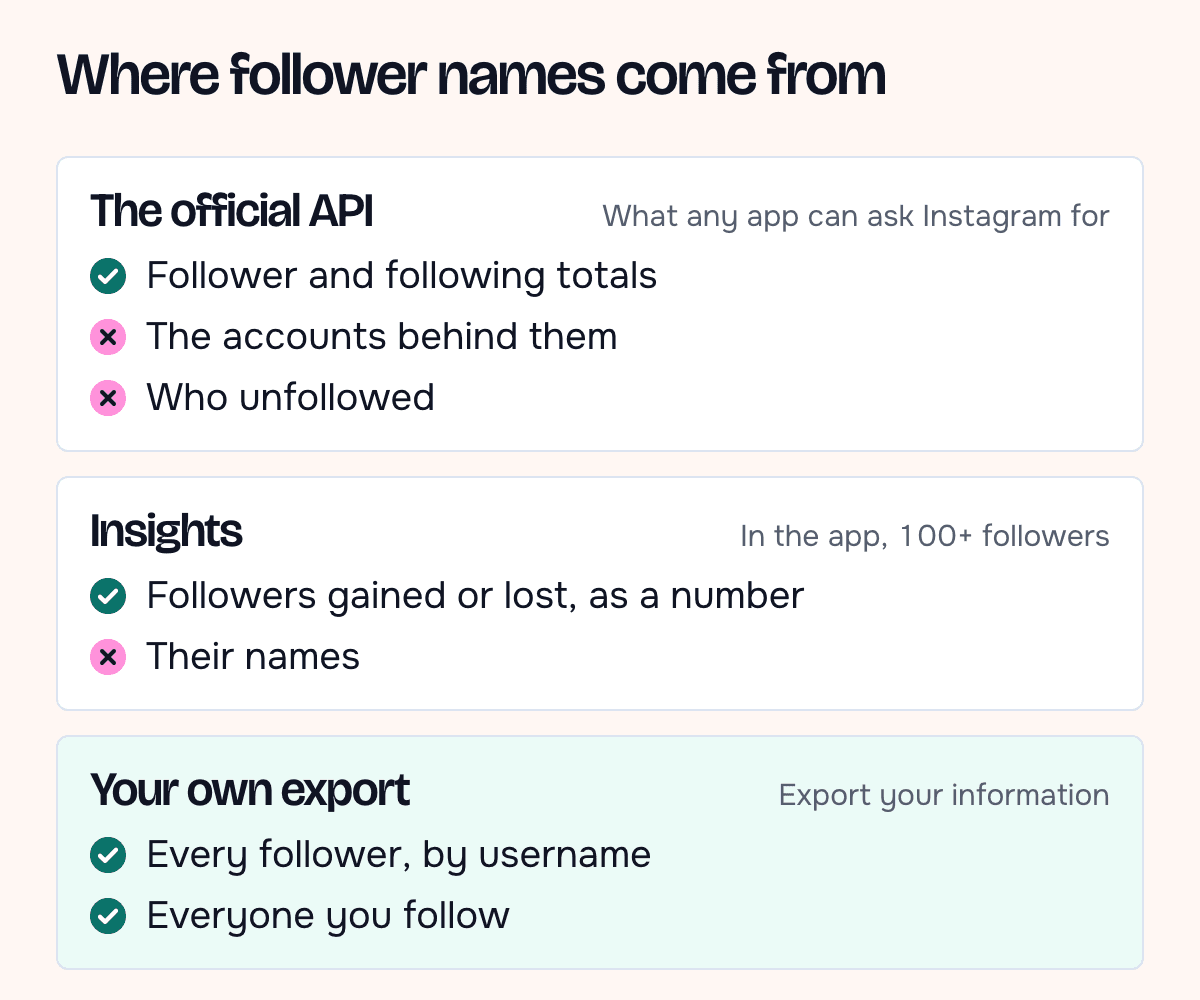
Put together, an app that shows you a list of named unfollowers is not getting it from the official API. It reads a file you give it, or it logs in as you and collects the lists itself.
Are unfollower apps safe to use?
The second kind, the app that asks for your password, is the risky one. Instagram's Terms of Use say you can't collect information "in an automated way without our express permission", and they also bar anyone from soliciting or collecting other users' login credentials.
Instagram's help page on restricted accounts lists the trigger in plain words: "You may have provided your username and password to a third-party app or website." The advice that follows is to be careful before giving any app access to your account. A restricted account is a high price for a list of names.
Before you use any app in this space, run three checks:
- Does it ask for your Instagram password? If yes, close it.
- Does it work from the export file you download from Instagram? That design never touches your login.
- Does it say where your list is stored and when it's deleted? If the privacy page is silent, assume the list is kept.
A safe way to see who unfollowed you
Instagram will give you your own follower and following lists. You only need two copies taken a few weeks apart. The steps below follow Instagram's help page on exporting your information; some people see "Accounts Center" instead of "Meta Account" while Instagram moves everyone over.
- Open your profile, tap the menu, then Meta Account.
- Go to Your information and permissions, then Export your information, then Create export.
- Pick Export to device, choose only followers and following, set the date range and format, and confirm.
- Wait for the email. Instagram says it can take up to 30 days, and the file stays available for 4 days once it's ready.
- Repeat the export later, then compare the two follower lists.
The comparison takes two minutes in a spreadsheet.
Paste the older list of usernames in column A and the newer one in column B. In C2, enter =IF(COUNTIF(B:B,A2)=0,"gone","") and fill it down. Every row marked "gone" is an account that followed you then and doesn't now. Some of those accounts were deleted or deactivated rather than unfollowing, so check a name before you take it personally.
What to do when your follower count drops overnight
A sudden drop is worth ten minutes before you worry about it. Work through it in this order:
- Find the day. Open Insights, pick the last 7 or 14 days and look at Growth. The day with the biggest loss is your starting point.
- Match it to what you posted. A drop the day after a post on a new topic, a sponsored post or a run of stories points at the content. A drop on a day you posted nothing points somewhere else.
- Get the names. If you exported your follower list before the drop, export again and run the spreadsheet comparison above.
- Check whether the accounts still exist. Search a few of the missing usernames. An account that no longer loads was deleted, deactivated or renamed. Meta's own API counts "unfollowed you or left Instagram" together, so part of any drop can be people leaving the app.
If most of the missing accounts had no posts, no profile photo and odd usernames, you may have lost spam accounts. That's a better audience, even if the number is smaller.
Looking at public accounts without logging in
Sometimes the question isn't about your own list. You want to see whether an account is still active, how many people follow it, or what it posted, without signing in or tipping anyone off. For that, the Instagram profile viewer shows a public account's bio and its follower and following counts, with no Instagram account needed.
Stories work the same way. The anonymous story viewer opens a public account's current stories without adding your name to the viewer list.
Older stories that someone pinned to their profile live in the highlights viewer.
These tools see what Instagram shows to someone who isn't logged in. That means public accounts only, and no follower lists. They can't tell you who unfollowed you, and no honest tool can do that without your own export.
FAQ
Does Instagram notify someone when I unfollow them?
No. Instagram's help center says it directly: "People won't be notified when you unfollow them." The other person only notices if they check their followers list or their follower count drops.
Can I see who unfollowed me in Instagram Insights?
Not by name. Insights shows how many followers you gained or lost in a period, once you have at least 100 followers. For names, compare two exports of your follower list.
Is there an official API that lists my followers?
No. The Instagram API returns follower and following totals and has no list of the accounts behind them. Apps that show named lists either read your export file or collect the data some other way.
Does Instagram Plus show who unfollowed me?
Meta's September 2026 announcement lists custom fonts, DM previews and notifications when certain people view your Story. Unfollows aren't on the list.
Can an app show who viewed my Instagram profile?
Not with data from Instagram. The official API has no field for profile visitors, and the Instagram Plus feature list from September 2026 covers Story views from certain people and says nothing about profile visits. An app that promises a list of profile viewers is guessing or making it up.
How often should I export my follower list?
Once a month suits most people. An export can take a while to arrive, and a monthly pair of lists is easy to compare in one sitting.